
 Integrated Color Picker for Visual Studio IDE.
Click here to download Color Picker extension for Visual Studio from Visual Studio Gallery.
Note: please show your support by giving a quick review in vsgallery . It only takes a few seconds.
This tool will very useful if you are working as a Web Developer or UI designer, who mainly uses Visual Studio for the day to day assignments.
This tool offers the below options,
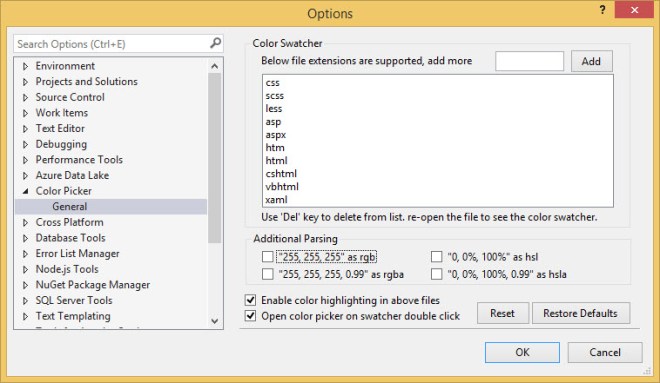
- Highlight colors in Visual Studio Document Editor (.css”, “.scss”, “.less”, “.asp”, “.aspx”, “.htm”, “.html”, “.cshtml”, “.vbhtml”, “.xaml” are enabled by default), Additional Parsing, Customize using Tools-Options-ColorPicker.
- Edit color using double click from any enabled file (editor).
- Insert colors to any active text document
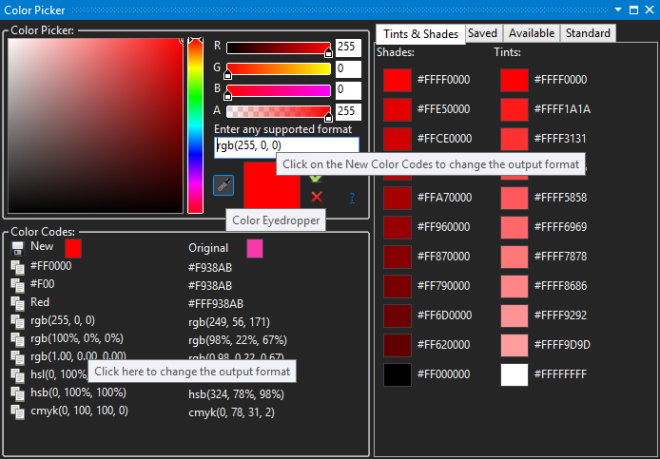
- Color Selection from Color Canvas.
- Color Selection from Available Colors.
- Color Selection from Standard Colors.
- Color Selection from Saved Colors.
- Color Selection using Eyedropper.
- Copy\Paste Color codes (Name, #HEX, rgb, rgba, hsl, hsla, hsb\hsv, cmyk). rgb and rgba are offered in different formats.
- Selected color’s Tints & Shades.
- Color code comparison of Orginal and New.
Currently this tool works with below Visual Studio versions (Visual Studio Theme supported),,
- Visual Studio 2012.
- Visual Studio 2013.
- Visual Studio 2015.
- Visual Studio 2017.
Color Picker can be accessed via Tools->Color Picker (will open a Dockable Window).

Tools->Color Picker
Tools-Options-Color Picker
Editor
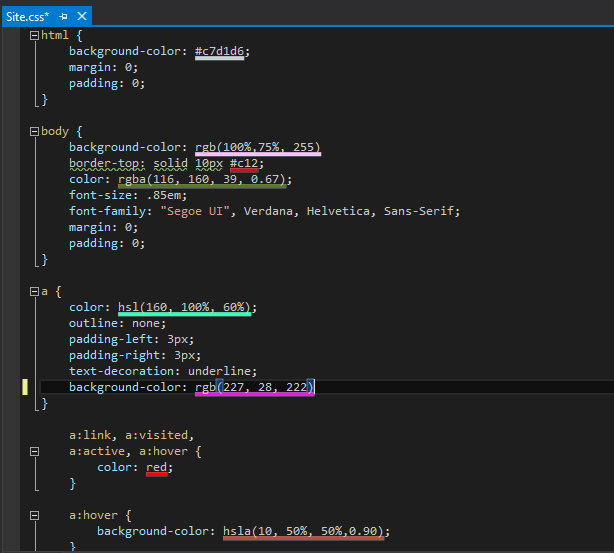
Color Picker in Editor
I have uploaded the initial source code in CodeProject. Please share your suggestions and feedback.

 Shemeer's World of Programming
Sure you could make eyedropper for automatic color picking over an image.
I would like to see an existing template for such an application.
Thanks you!
When i use colors written in hex with alpha channel, color picker interprets it as #ARGB, whereas CSS uses #RGBA, is there any way around it? How can i change it?
Would appreciate any response.
I am now asking if Color Picker can be installed in Visual Studio as a toolbox with all good
properties it has?
Can you add VS 2019 support? It’s working now, but after using ColorPicker, IntelliSense (tips) is stop working
I like this tool, however, I can’t install it in VS 2019 v 16.11.4. Also, will not install in VS 2022
Hi,
Is it planned to add VS2022 support?
Pingback: Integrated Color Picker 1.2 released for Visual Studio IDE. – Shemeer's World of Programming
Pingback: (Instant) Desktop Color Picker. – Shemeer's World of Programming
Pingback: Integrated Color Picker 1.1 released for Visual Studio IDE. – Shemeer's World of Programming
Pingback: Integrated Color Picker for Visual Studio IDE. – Shemeer's World of Programming
Hi,
I use Visual Basic 2022. It needs to add “vb” file extension manually from time to time. Since, the Extension look like get reset without touching it randomly. Then, would you please add “vb” in the default list?
Thank you in advance. 🙂
The expansion breaks when you select a dropper and point it at an additional monitor. In my case there are 2 monitors. I write code on one and try to copy colors from the second one. Studio crashes.