
Changing Visual Studio 2013 CAPS Menus to Normal

Are you okay with Visual Studio 2013 ALL CAPS Menu? If not there’s a simple solution.VS 2013 Menu to Normal Small letter
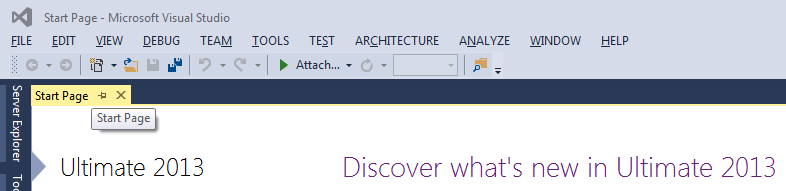
I have attached the .reg file with post. Extract the downloaded zip file and execute the reg. file with admin rights.

Restart Visual Studio 2013. It’s Done. If you want you can review the downloaded reg file in any text editor before executing.

If you want to do this manually then Open the Registry Editor (regedit) and add the below key and value.

Note: If you do anything wrong in this registry editing then Visual Studio 2012 won’t work after splash screen

[code]

HKEY_CURRENT_USER\Software\Microsoft\VisualStudio\12.0\General\SuppressUppercaseConversion
REG_DWORD value: 1

[/code]

Download zip contains .reg from Codepoject

I just ran this and I got the normal menu like below,
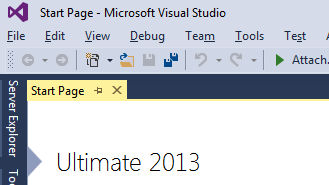
Visual Studio 2013 Normal Small Menu

If you want that CAPS Menus back then just remove the above key from the specified location.

Very useful and handy String constructor, String(Char, Int32)

String Constructor - strings of repeated charachterWe all work with string values in our daily programming life. Sometimes we might require a string variable to be initialized with strings of a repeated character.

Now let us come to the point.

.NET Framework String class already have a parameterized constructor to do the same.

String Constructor (Char, Int32)

C# Syntax:

[code language=”csharp”]

public String(
char c,
int count
)

[/code]

MSDN: “Initializes a new instance of the String class to the value indicated by a specified Unicode character repeated a specified number of times.”

See the sample usage given below,

[code language=”csharp” highlight=”7″]
class Program
{
static void Main(string[] args)
{
int size = 10;

string sample = new String(‘-‘, size);

Console.WriteLine(sample);

Console.ReadKey();

//Outputs : ———-
}
}[/code]

This is the most straightforward and efficient way to initialize a string variable with strings of repeated characters.