
Click here to download File Path On Footer extension from Visual Studio Gallery.
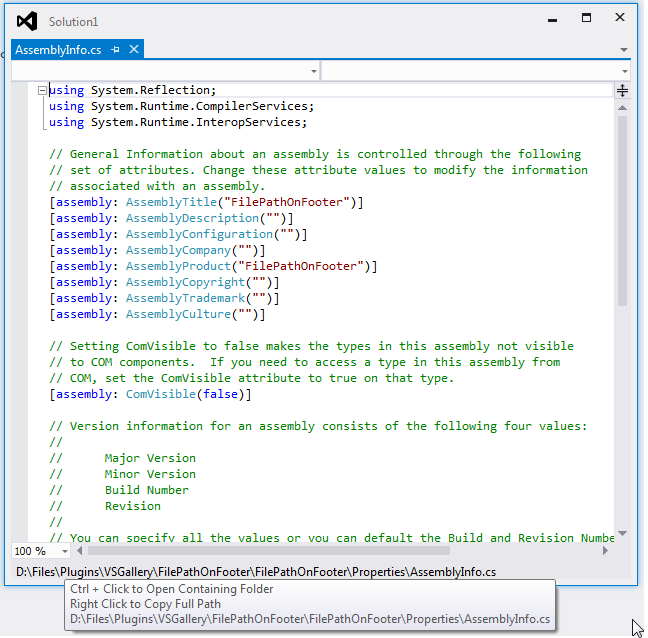
This lightweight extension lets you display the full path of the file at bottom of Visual Studio’s Editor. Click Ctrl+Clcik to Open Containing Folder, Right click to Copy Full Path.
This will be very helpful if you are working on files which is having similiar and or same name. Visual Studio IDE already shows the file path when you hover the mouse over the document tab but I like to see the file name always on bottom of editor. So we know where we are.
Using this plugin you can,
- File name always on bottom of editor.
- Open Containing Folder using Ctrl+Click.
- Copy Full Path using Right Click.
- Copy Partial Path using text selection.
- Use Alt + Click to force Theme updation.
- Standard Visual Studio themes are supported.
- Environment Font settings are also supported.
- HighContrast/Themes Supported
Visual Studio themes are supported,
Blue

Dark

Dark With Light Editor

Green

Light

Light With Dark Editor

Purple

Red

Solarized (Dark)

Solarized (Light)

Tan

Note: Rarely theme change will be reflected only after restarting visual studio.
Don’t have aditional themes for Visual Studio, then get it from Visual Studio Gallery
Supports Environment Font settings
Tools->Options->Environment->Fonts and Colors->Environment Font
Sample screenshot with custom Environment Font setting

Intrested to see how to create an extension like this then read “Getting Started with Visual Studio Editor Margin Extension” from CodeProject.com.
Please share your suggestions and feedback.

 Shemeer's World of Programming
Pingback: File Path On Footer Extension for Visual Studio | Shemeer's World of Programming
Pingback: File Path On Footer Extension 1.2 released with Visual Studio Theme Support | Shemeer's World of Programming
Good morning from Berlin/Germany!
Sincerely “File Path On Footer” raised an exception yesterday trying to open the clipboard.
After closing the exception I tried again, the desired file path came into the clipboard, but VS2013 crash and restarted.
After the restart I couldn’t reproduce the problem.
Any chance to catch such exceptions, like when raised while failing when trying to open the clipboard?
Best regards,
Martin
I will try to handle unhandled exceptions in next version. please let me know if I can easily replicate this issue.
Thanks for reporting this issue. Please update it to version 1.4.1.
please share a quick review in vsgallery.
Hello from France!
Congratulations for your extension, it’s very nice 🙂
I just find a little bug when the extension is activate and you try to run a SQL Query in VS 2013 (don’t try in 2012).
for me it’s a big problem so i have to desactivate your extension 😦
i hope you can correct it in a new version.
Good luck!
Thibaut
Thanks for the feedback :).
This issue has been already taken care in version 1.4. I will be releasing that in couple of hours.
Thanks!
Download in progress 😉 i will tell you if i find another bug
Sure, I will wait for your updates 🙂
please show your support by giving a quick review. It only takes a few seconds.
Hello!
Review done on VS Gallery 🙂
It’s ok for SQL Query and i didn’t find another bug (for the moment 😉 ).
Just a little problem with my theme. I’m on a custom theme based on Dark editor, and the file path extension render like this :
http://1drv.ms/1qUZ4K1
do you know the parameter to change to have it in correct dark? i didn’t find it in the color editor
Hi,
sincerely your extension raises, the first time used with the right mouse button, the exception to be seen in the screenshot https://farm9.staticflickr.com/8591/15384297273_a98ba898a6.jpg.
Any chance for fixing this?
Best regards,
Martin
Thanks for reporting this issue.
Is the file path copied to clipboard after the getting this exception also ?
Yes, the path got copied!
I have fixed this issue in version 1.4.3 and also added support for custom environment font settings. Please update.
Also please show your support by giving a quick review. It only takes a few seconds 🙂
Sorry, but … your visual studio gallery page for “File Path On Footer” (https://visualstudiogallery.msdn.microsoft.com/d9fc97d4-3b42-4b56-ba47-23f8b81ebd17) returns an error.
Even updating from within VS2013 is currently impossible.
Visual Studio Gallery page is back. Please check.
Yes, the page is back, but not working correctly. Please see: https://farm9.staticflickr.com/8606/16344788261_7748b502bb.jpg
All image files got deleted while Visual Studio Gallery team worked on the page issue. Now I need to upload the image files again. Download works without any issue.
Yes, download to update the extension works, but after the successful update, the VS extensions dialog does not mark the extension as updated and the “download” button is still working to download and to start the installation of the extension, which itself denies to install again.
Any chance you’d consider open-sourcing this? I’d love to change this extension to only display a relative path.
Hello, I require some time to re-arrange the code for making it open source.
I like the relative path idea, I can get the relative path option added in this plugin, can you tell me how you would like to configure the relative path?
Hello, I’m using Visual Studio 2015 RC with your File Path On Footer extension, but I meet two issues.
First it doesn’t fit Visual Studio’s dark theme.
Then the more important, it throws NRE and causes Visual Studio to crash when setting breakpoint condition. Here is the stack trace and I hope it’s useful: https://gist.github.com/CnSimonChan/4e567956061701b6c347
Thanks
Thanks for the findings, Surely will roll out a new version with these fixes.
Hello, Can you try with latest version 1.4.5.
*Theme support may not be working for RC version.
It no longer crashes, thank you!
Thanks for the confirmation, Please have a review in gallery 🙂
Sorry, can’t update from visual studio and trying to download from visual studio gallery gives a 404:
http://moby.to/zno4ze
VSGallery team was working on that issue, I do see that the page is up but image are not there and its downloading PowerShellTools.vsix. Let me check that.
Don’t know why the page is getting issues.
VStudio team is working on this issue, Have shared the provided screenshot with them.
Please try now, Page is back.
Good Morning from Berlin! Update to the current version now worked! Thanks for your efforts!
Nice extension. Would it possible to make the text selectable? I sometimes have cases where I’d like to copy partial paths, especially when working between branches.
Cheers!
Nice extension. Would it possible to make the text selectable? I have scenarios where I’d like to copy partial paths (for example, when working between branches).
Hi David, Planning for next version, will try to get it with that version
Please update to version 1.4.7 and let me know your feedback
I am enjoying your extension. I am currently using it on VS 2015 and other then it always having a white background, it seems to work great. Is it possible to make it so it only shows on the bottom when I do a split screen? When I do a split, it shows it on the bottom of both parts and shows the same information.
I wanted to get this implemented but unfortunately the solution taking more time 😦
Added this to ToDo List.
Since working with UI Zoom of 150% I have often the situation, that VS2013 places the current execution line – after hitting a breakpoint – right behind the file path.
In consequence I have to scroll before I can see the current execution line.
Before using the UI Zoom I didn’t have this “problem”.
Could it be, that VS2013 does not know about this UI element, so it places the current execution line “behind” it?
Hi,
again and again VS2013 places the stop of an execution at a breakpoint right behind the “File path on footer” UI elements.
So I still think, that VS2013 does not really know, that its current execution line is hidden by the UI elements of “File Path On Footer”.
Could please take a look?
Best regrads,
Martin
Sure Martin, Let me check, Hope this issue is not there when you do 150% zoom with this plugin.
Hi,
question: would it be possible to extend theme support for high-contrast theming (accessiblity theme)?
I need to use the high-contrast-#1 theme as desktop theme and VS2015 automatically uses the “high contrast” theme, which has black window background, yellow window text, white frame color, green selection color, etc..
While VS2013 used a kind of dark theme to emulate the high contrast mode, VS2015 does not.
And so your extension looks dark with white text in VS2013 and light with black text in VS2015.
Please, change this behavior or add additional theming, since it “hurts” my eyes! Some colleagues say: working in black high-contrast-mode “hurt” their eyes! 😉
Cheers,
Martin
HighContrast support added on latest version 1.4.7
BTW – all images on this page are “gone”, not loaded!
Need to update the URL as old image URLs are broken from VSGallery.
Ever used “File Path on Footer” while peeking into code?
In VS2015 the file path is even shown in in-place code views (peeks)!
And even here the in-place code views don’t seem to know about the used area – like when VS2013/15 places the current execution line after stopping at a break point right below the area of “File Path on Footer”.
Any solution available or thinkable, but uninstalling?
Cheers,
Martin
I’m okay showing file path while peeking code, are you thinking different?
I will check the Breakpoint issue while Zoom 150%
Hi Shemeer,
The smaller the room on the screen, the less important file-path-on-footer
is within peek areas, right?
Especially, if VS2015 doesn’t seem to know about the existence of the
extension UI, so that no code is visible within the peek area, if the
extension UI hides the code within the peek area!
Cheers,
Martin
Pingback: File Path On Footer 1.4.7 released – Shemeer's World of Programming
Right-Click to copy isn’t working in VS2022. An empty clipboard entry is created each time you right-click.
The right-click to copy isn’t working in VS2022 version 17.0.4. It creates a blank entry in the clipboard each time you right-click.
Pingback: File Path On Footer Extension 1.2 released with Visual Studio Theme Support – Shemeer's World of Programming
Pingback: File Path On Footer Extension for Visual Studio – Shemeer's World of Programming